
Learn how we map invoices across your systems and match them against a statement. We'll explain how we classify invoices within your ledger, our matching rules and stages designed to get the most accurate invoice match for your statements 🎯
Contents:
- The five-step reconciliation process
- How we classify your invoices
- How we match your invoices
- Matching outcomes
1. The five-step reconciliation process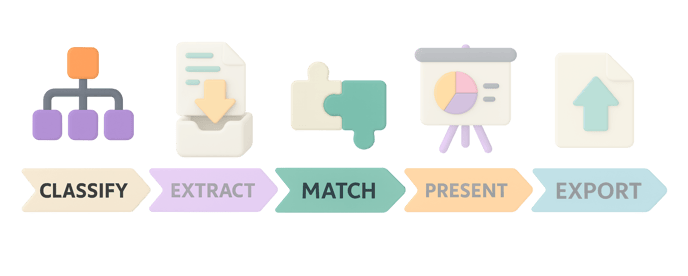
Xelix follows a five-step reconciliation process. In this article we’ll dive deeper into the Classify and Match stages, particularly how we classify your invoices within your ledger, and how we match these invoices to your statements.
The other steps:
- How do we extract information from your invoices? check How to reconcile a statement
- How do we present your reconciliation results? check Rec Results Page: Ledger, Statement and Action panels and How to set a Reconciliation Basis to learn how our Status and Assign Actions can ignore invoice timing and/or posting details
- How do we export your reconciliations? check How to export and share your reconciliation
- Want to dive deeper into Match? check How to set Matching tolerance & How we assign Status and Actions: Matching criteria
2. How we classify your invoices
We source your invoices from two main pools:
- Invoices received on the ledger date
- Invoices open or closed after the ledger date
- Invoices that have the same supplier, subsidiary, currency as documented on the statement
- Invoices that have a posting date before the ledger date
2. Non-ledger invoices include all other invoices that don't meet the above conditions
3. How we match your invoices
Matching types:
We have two types of matching processes that we apply based on the invoice pool we're searching:
Initial matching: This is a matching type that we apply when we are searching for invoices within your ledger.
Fuzzy matching: This is a matching type that we apply when we are searching for invoices outside your ledger.
Invoice pools:
We source your invoices from three main pools:
- Ledger invoices: Where initial matching happens. Successful matches here are cleaner and need less action from you. These consist of invoices that were open on your ledger against the supplier, subsidiary and currency you selected for the reconciliation
- Non-ledger invoices: Where fuzzy matching happens, casting a wider net for possible matching invoices. Successful matches here often have mismatches for other invoice properties and need your investigation.
- Deleted invoices: If we can't find your invoice within or outside your ledger, we'll check your deleted invoices as a last resort. If we still can't find it, you're likely missing an invoice copy.
💡 Note: Think of pools 2 and 3 as “other invoices”. Any invoices found here can be in any state not contained in the “Ledger invoices” (i.e. posted against different vendors, open at different times, deleted etc).
Invoice number formats:
For each invoice, we consider two formats:
- Original invoice number: Your invoice number as it appears (e.g., INV#12A34B56C)
- Stripped invoice number: Your invoice number with all non-numerical characters removed (e.g., 123456)
The 6-stage matching priority
Rather than running every possible match against all invoice pools, number formats and matching types, we follow a series of matching stages.
We don't go through every stage for each reconciliation, we only move to the next stage when no match is found previously.
Stages 1-4: Main matching
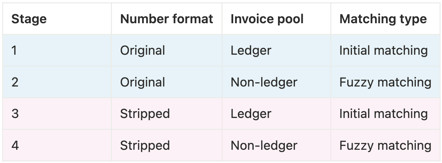
Stages 5-6: Deleted invoice matching
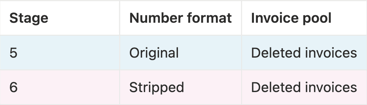
💡 Note: If we still don't find the corresponding invoice across all pools, you're missing a copy. We flag this so you can contact your vendor.
Why do we follow a matching priority?
Our matching priority ensures we match your statement to the most appropriate invoice across your system(s).
By checking against all invoice pools sequentially, we can confirm your statement details against the selected invoice details - and spot any differences. This then allows us to populate your reconciliation line results.

To learn more about how we populate the Status and Assign Actions columns, check our guide on How we assign Status and Actions: matching criteria.
4. Matching outcomes
Initial matching success (stages 1 & 3)
When we find an invoice within your ledger:
- Confirms the invoice entered your system before we received the statement
- Invoice is pending payment
- Matches the correct vendor, division, and currency
- Date and amount may still mismatch (which we flag)

Fuzzy matching success (stages 2 & 4)
When we find an invoice outside your ledger:
- Casts a wider net for possible matching invoices
- More likely to have mismatches across multiple fields
- May uncover incorrect vendor, division, or currency allocation
- May reveal if the invoice has already been paid or subsequently posted

Deleted invoice success (stages 5 & 6)
When we find an invoice among deleted invoices:
- Usually requires your investigation
- Often arises from manual errors

By the way…
This article outlines the rules applied to our default 'Standard' Reconciliation basis.
Reconciliation basis is the matching environment that follows specific rules. The standard rec basis shows you posting and timing differences in your invoice.
If these differences don't matter to you, we offer three other rec basis options that let you ignore them. To learn more about choosing what "reconciled" means for your workflow, check How to set a Reconciliation Basis.