
Customise your Reconciliation Basis in Statements settings to define what qualifies as a "Completed" reconciliation. Explore our basis options and choose to ignore invoices with timing differences and/or posting differences.
Contents
- 3.1 Standard basis
- 3.2 Timing not a difference
- 3.3 Unposted not a difference
- 3.4 Timing and unposted not a difference
1. The five-step reconciliation process

Xelix follows a five-step reconciliation process. In this article we’ll dive deeper into the Present stage, particularly how we present your Reconciliation Results under different Reconciliation Basis settings.
The other steps:
- How do we classify your invoices? check How we match invoices: Matching logic
- How do we extract information from your invoices? check How to reconcile a Statement
- How do we match your invoices? check How we assign Status and Actions: Matching criteria
- How do we export your reconciliations? check How to export and share your reconciliation
- Want to dive deeper into present? check Rec results page: Ledger, Statement and Action panels
2. Reconciliation Basis settings
When performing a reconciliation, Xelix identifies invoice differences arising from timing, posting status or payment status. If these differences don't matter to you, we offer three other reconciliation basis settings that let you ignore them.
The setting you select differentiates what counts as a completed rec.
💡 Note: Xelix defines a difference as: a discrepancy between an invoice on a statement and its corresponding entry in your ERP system.
You can find Reconciliation Basis settings in your Statement settings, on the bottom right-hand side of the page.
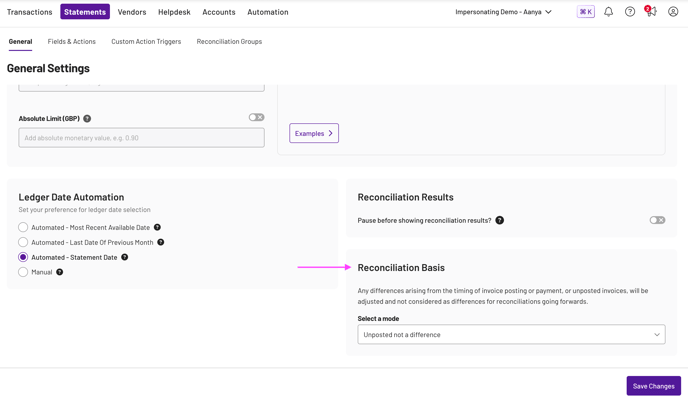
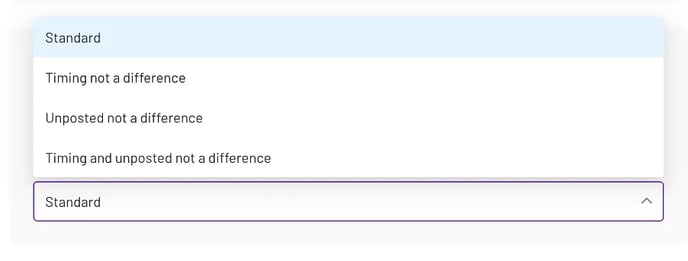
💡 Note: The basis you select only applies to reconciliations created after enabling the setting.
3. The Reconciliation Basis options
3.1 Standard basis
Flags all timing and posting differences. We'll tell you about invoices:
✅ Paid before
✅ Subsequently posted
✅ Payment scheduled
✅ Unposted
✅ Not on ledger
Example: how your rec results page will look under the Standard Reconciliation Basis


For any invoices with timing and/or posting differences, we assign the Status as 'Not open on Ledger'.
Then, under 'Open at Ledger date' column, Xelix clearly defines why your invoice is 'Not open on Ledger'. This influences what action we assign for your invoice.
In this case, the first invoice is stuck in your workflow and we've assigned the 'unposted' action. The second invoice has already been 'Paid before' its corresponding ledger date and we assign it the same action.
3.2 Timing not a difference
Ignores timing discrepancies. We won't flag invoices that are:
❌ Paid before
❌ Subsequently posted
❌ Payment scheduled
Instead, we assign these statuses and actions:
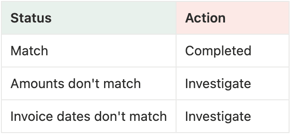
Example: how your rec results would look under Timing not a difference Reconciliation Basis:

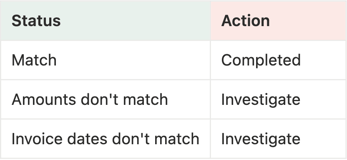
For any invoices with timing differences, instead of assigning the Status as ‘Not open on Ledger’, we tell you if the rec is complete or needs investigation due to mismatch for amount or invoice date.
In this case, the amount and invoice dates match, hence flagged as ‘Match’ under Status and the assigned actions is ‘Completed’.
3.3 Unposted not a difference
Ignores posting discrepancies. We won't flag invoices that are:
❌ Unposted
❌ Not on ledger
Instead, we assign these statuses and actions:
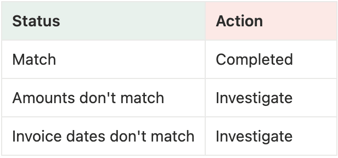
💡 Note: Under this basis, only invoices without an identifiable posting date will be flagged as ‘Unposted Only’ under Status, and marked as ‘Completed’ under Actions.
Example: how your rec results would look under Unposted not a difference Reconciliation Basis:

For any invoices with timing differences, we don't assign the 'Not open on Ledger' status. Instead, we tell you if the rec is complete or needs investigation due to amount or invoice date mismatches.
In this case, the amount and invoice dates match, so it's flagged as 'Match' under Status with 'Completed' as the assigned action.
3.4 Timing and unposted not a difference
Ignores invoices with timing or posting discrepancies:
❌ Paid before
❌ Subsequently posted
❌ Payment scheduled
❌ Unposted
❌ Not on ledger
Instead, we assign these statuses and actions:
Ready to dive deeper? So are we. Check out our guide on How we assign Status and Actions: Matching criteria to learn how we process and define your reconciliations.