
Contents
1. What are custom prompts
2. How custom prompts work behind the scene
3. How field-level instructions work
1. What are custom prompts?
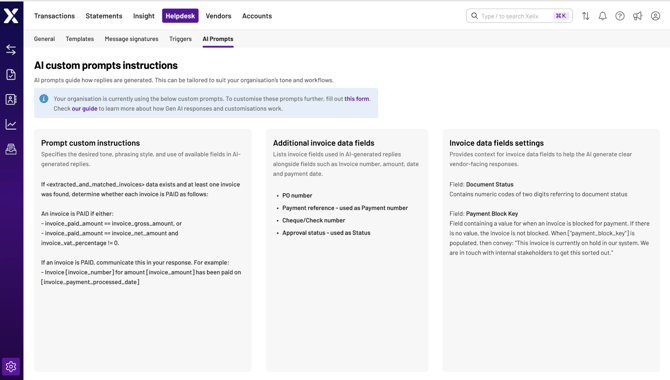
Custom prompts are instructions given to the AI that informs how it writes responses to your vendors. Think of them as guidelines that help the AI understand your preferred tone, phrasing and what information to include or avoid.
Our AI generates each response on demand, using Large Language Models (LLMs). This means the exact wording varies slightly each time, but the meaning and style can be interpreted based on your custom instructions.
💡 Note: If you don’t have customised instructions, the LLM will generate a response that relays the necessary contextual information but doesn’t use any specific tone and/or phrasing.
2. How custom prompts work behind the scenes
When we generate a response, we build it using multiple layers of instructions:
- Organisation-level customisations: Your business-wide preferences for tone, phrasing, style and invoice context
- Fields used in customisation: Fields related to any customisation requests
- Field-level instructions: Rules applied to specific data fields in your invoices
We can inject custom instructions into the prompt based on what data is available and what rules you need configured. This tailors the generated responses to your business needs so that the responses sound like you and communicate the right details at the right time.
3. How field-level instructions work
When your invoice contains specific information (like a hold code or payment status), based on your preferences, Xelix can automatically add more specific instructions to guide the AI response.
For example, if an invoice is on hold, we tell the AI to explain the hold reason in simple, vendor-friendly terms (provided we have the hold status or hold reasons from your ERPs within Xelix).
This lets us:
- Control wording: Use your preferred phrases (e.g., "we're processing this internally" instead of "we're busy processing")
- Add real context: Explain delays using actual invoice data, like status or translated hold codes
- Adapt automatically: Change the response based on invoice state or which system it came from
- Handle gaps: Use general instructions when specific data isn't available
4. What you can customise
We can tailor AI responses based on your invoice data and business preferences. Here's what you can configure if the right information is provided to us:
Communication style:
- How we phrase processing delays
- Date formatting preferences (e.g., DD-MM-YYYY or written formats like "15 January 2026")
- Phrases to avoid (e.g., never comment on overdue status)
Invoice information:
- Which reference numbers to always include (PO numbers, check numbers, payment references)
- How we explain hold reasons using your hold codes
- Payment timing expectations based on terms, due dates and processing status
- Extended invoice details like receipt dates or approver information
System-specific handling:
- Translate status fields from your ERP into vendor-friendly language
- Handle differences between ERP and workflow system statuses
- Route specific query types to different mailboxes
5. Examples of what we can do
Depending on what data you share with Xelix, we can configure the AI to:
- Explain why a document is still being processed based on invoice workflow status
- Provide context about invoice holds using your hold codes
- Communicate expected payment timeframes in accordance with your payment terms
- Always mention specific reference numbers your vendors need
- Format dates consistently in your preferred style
- Route certain query types to specialised inboxes (e.g., redirect queries about paid invoices to a different mailbox)
- Avoid specific topics or phrases based on your communication policies
6. Requesting customisations
If you'd like to customise how the AI communicates on your behalf, you can request changes through the Helpdesk Settings > AI Prompt page.
Click "this form" to raise a ticket, and our team will work with you to configure customisations based on your needs.
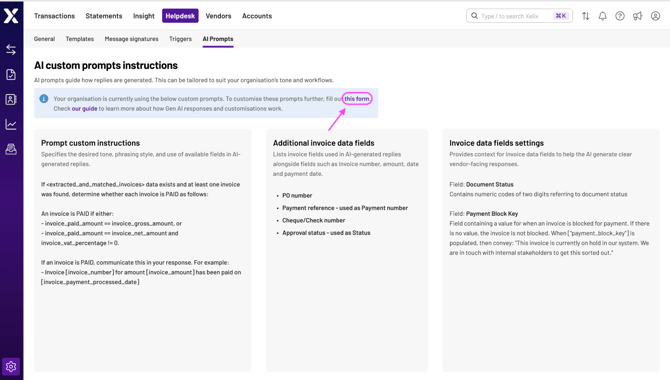
We'll help you identify which invoice fields can enhance vendor communication and configure the instructions accordingly.
💡 Note: Customisations require testing and validation by our AI Engineering team before going live. This isn't a real-time update to your Gen AI replies.
Next, learn how we generate responses to your tickets in our guide, How Gen AI replies works