This month, we're making your life easier with intelligent automation and better control. Helpdesk now intelligently categorises tickets, searches by ID, filters by field and lets you see confidence scores on generated responses. We've also introduced Helpdesk Teams for better ticket organisation.
In Statements, you can now customise exports and use upgraded triggers to move closer to Touchless reconciliation.
Helpdesk
1. Smart categorisation
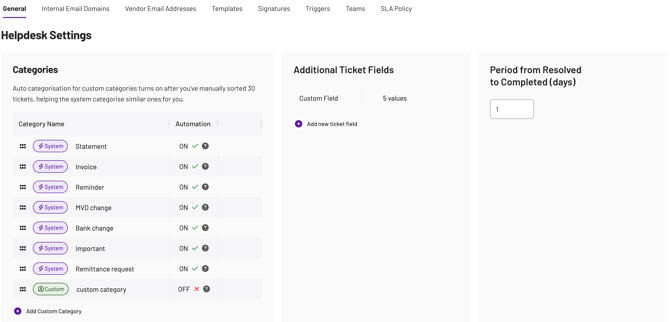
Helpdesk now auto-categorises tickets once your team shows a stable pattern. Custom categories activate themselves after 30 manual applications - no risky toggles, no setup required.
Default categories are always on, and admins can turn off smart categorisation for any custom category if needed.
The goal?
→ Save time on repetitive triage
→ More consistent categories lead to better triggers, routing, SLAs and reporting
→ Low-risk activation: Only after your team signals clear patterns
→ Full admin control: Turn off auto-categorisation whenever needed
How can I use it?
Identify 3-5 high-volume custom categories and encourage your team to label them consistently early on. If seasonality changes a category's pattern, admins can temporarily switch it off.
2. Helpdesk search
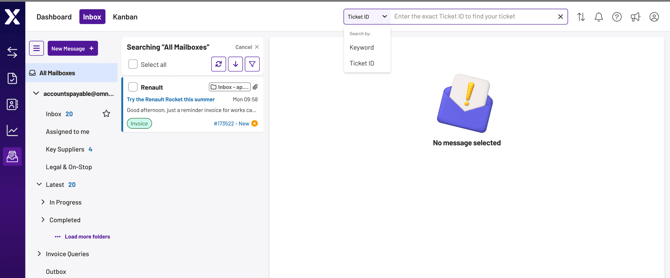
We've upgraded Helpdesk search to help you find exactly what you need, faster.
Ticket ID search
You can now toggle between keyword search and ticket ID search.
💡 Note: Ticket ID search requires an exact match, so you’ll have to input the exact numbers.
Advanced field search
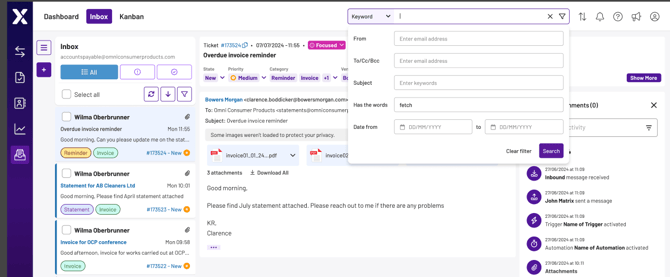
Within keyword search, you can now specify exactly which fields to search:
- Subject
- From
- To/cc/bcc
- Email body
- Email date range
💡 Note: We've also added dropdown suggestions for address fields to speed things up.
The goal?
→ Find tickets faster with more precise search filters
→ Switch between search types based on what you know
→ Use address field suggestions to avoid typos
3. Confidence score
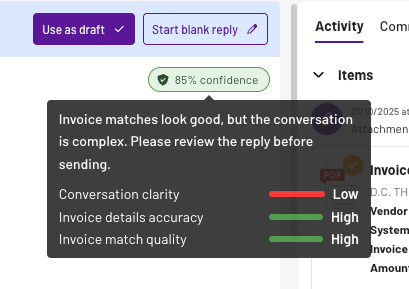
After drafting a Gen AI response, we'll show you a confidence rating that indicates how accurate we believe our output is.
This appears as both a label (HIGH / MEDIUM / LOW) and a percentage out of 100, calculated by combining three individual task-level confidence ratings:
- Conversation clarity - how complicated we believe the thread is
- Invoice details accuracy - how correct we think the matched invoice data is
- Invoice match quality - how confident we are that we've matched the correct invoice
By clicking through the confidence rating, you can make faster decisions about sending generated replies, ultimately reducing cycle times for ticket resolution.
→ Make informed decisions about AI-generated responses
→ Reduce time spent reviewing drafts
→ Send replies with confidence
4. Helpdesk Teams
Helpdesk now supports Teams, allowing you to organise ticket ownership beyond individual users. As AP departments scale across regions or specialisations, team-based assignment will add better structure and visibility.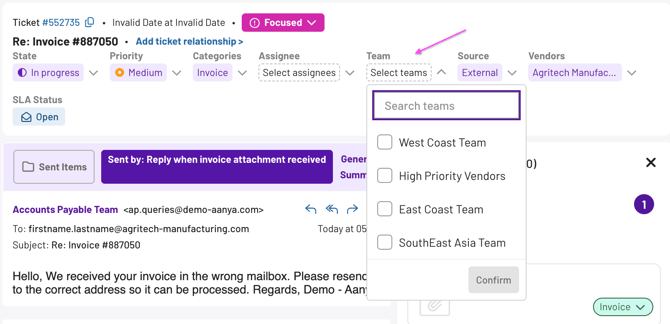
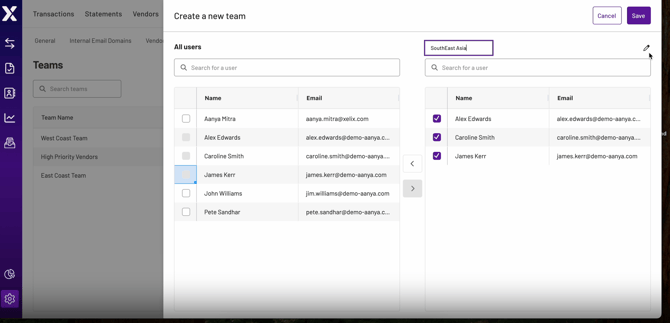
To set up teams, go to Helpdesk Settings and select the 'Teams' tab. Add users to a team, then assign teams to tickets as needed.
💡 Note: Only Admins can create Teams in Helpdesk Settings.
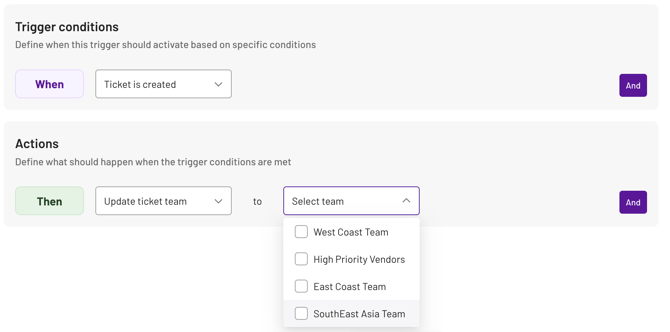
You can assign tickets to teams automatically via Helpdesk Triggers. You can configure Triggers to automatically route tickets to a team based on vendor, category, or other specified criteria.
The goal?
→ Organise tickets by geography, vendor type, or specialisation
→ Improve visibility into team workloads and ownership
→ Enable flexible routing and load balancing
→ Scale your Helpdesk operations as your AP department grows
Statements
1. Custom exports
Take full control of your reconciliation exports with complete customisation options.
You can now add columns, remove columns and rename columns to match your exact needs. Decide which sections and tables appear in each export and what columns each section has.
Exports are fully configurable based on type (PDF or spreadsheet) and audience (internal or external). You can even customise headers and footers, including removal of "Powered by Xelix" branding.
The goal?
→ Create exports that match your business reporting standards
→ Tailor outputs for different stakeholders
→ Present data exactly how you need it
→ Standardise vendor messaging and branding
💡 Note: Get in touch with your dedicated Customer Success Manager to set up your custom export templates.
2. Triggers upgrade
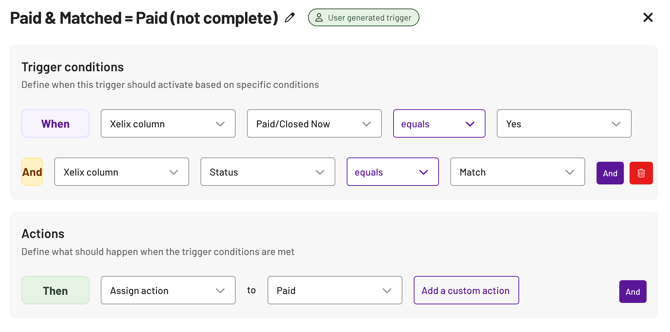
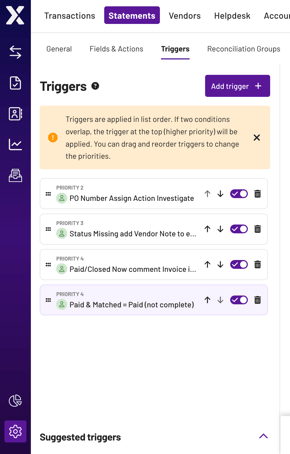
Upgraded triggers bring suggested templates, expanded condition fields, and "and" functionality to automate routine reconciliation tasks and move you closer to touchless processing. By training the system to handle work on your behalf, you can focus on the results of your reconciliation, rather than the process.
The goal?
→ Let automation handle the boring stuff
No need to manually process routine statements. Win back hours of your week to focus on the work that needs your critical judgement.
→ Get up and running in minutes, not days
Pre-built templates mean you can start automating immediately, without wrestling with complex setup.
→ Build smart rules that actually understand your reconciliation needs
Combine multiple conditions to handle those tricky edge cases that used to require manual intervention.
Take a look:
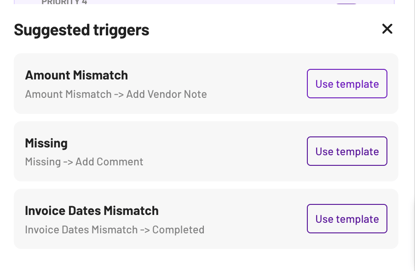
Suggested triggers
We've added pre-made trigger templates to help you get started:
- When there's an amount mismatch → add a vendor note to the reconciliation
- When an invoice is missing → create an internal comment
- When invoice dates are mismatched → mark the rec as complete
New condition fields
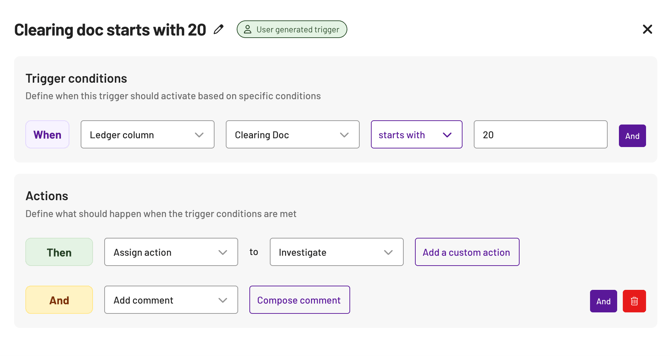
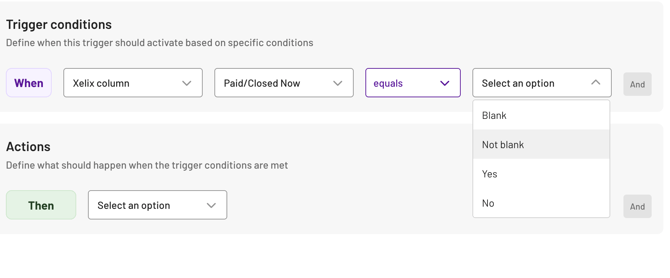
New condition fields include 'starts with', 'blank', and 'not blank'.
"And" functionality
We'd recommend making the most of our "and" functionality to refine your reconciliation rules to cover all types of invoice conditions.