
November brought automation that closes gaps and saves time. You can now manage signatures centrally in Helpdesk, capture instant vendor satisfaction, connect related tickets and enjoy upgrades to your dashboard view.
In Statements, clean reconciliations can now close themselves with Auto-reconcile while enhanced automation drives touchless rates toward 70%. 🚀
Helpdesk
1. Upgraded signatures
Now you can manage signatures centrally and assign different defaults to each mailbox.
This means that users handling multiple departments or client inboxes can automatically send the right contact details, branding and legal disclaimers in their signatures without manual input.
💡 Note: Each mailbox can only have one default signature.
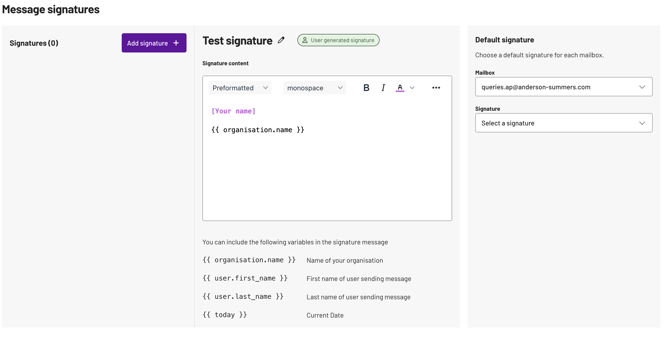
How it works
Step 1: Add signature - create a signature for a specific mailbox.
Step 2: Edit signature - update the signature's content and formatting as needed.
Step 3: Set default - associate the mailbox with a signature to mark it as the default.
The goal?
→ Save time by standardising signatures across select mailboxes
→ Ensure consistent branding in every outbound email
→ Deliver better personalisation for diverse client groups
2. Customer satisfaction surveys (CSAT)
You can now capture vendor satisfaction automatically, right at the moment you close a ticket. No extra steps, no follow-up emails - just instant feedback when it matters most.
How it works
When you hit Reply + Resolved, a CSAT survey is automatically included in your resolution email.
💡 Note: If you reopen and resolve the ticket again, a fresh survey goes out. The new score will override the previous one, giving you a chance to turn things around based on earlier feedback.

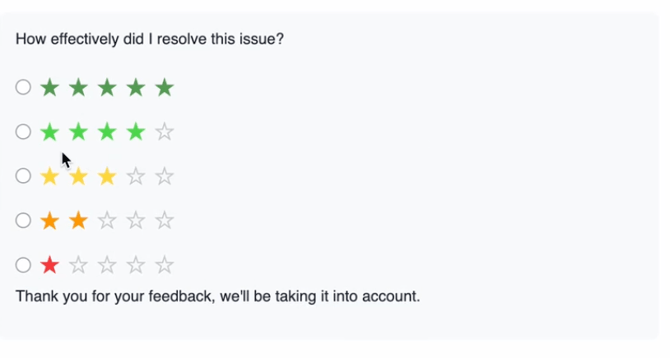
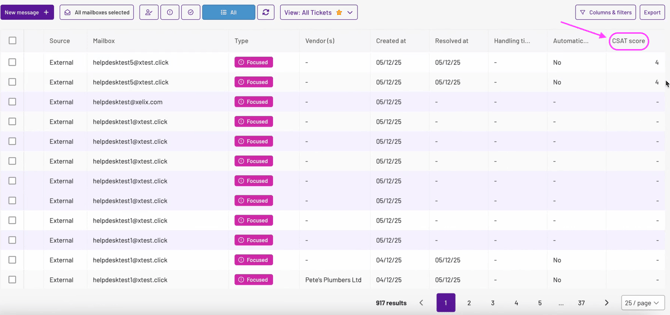
Vendors rate their experience with a 1-to-5 star system, which you can track in your All Tickets view.
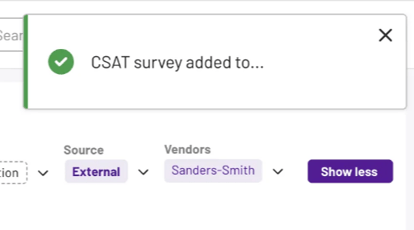
You'll see toast notifications confirming when CSAT has been added to an email.
💡 Note: We’re working on Dashboard widgets and Activity Panel updates to give you even more visibility into CSAT trends.
The goal?
→Get instant feedback without chasing→Spot high performers and catch vendor risk early with clear visibility into every resolution
→Improve your vendor relationships by maintaining their satisfaction ratings
3. Related tickets
Now, when a vendor follows up on a resolved issue, forwards a message or copies multiple mailboxes, Helpdesk relates the tickets to each other.
You can see the full picture in one place.
How it works
Tickets will auto-link when:
- A new message arrives into a Completed ticket. This ticket will now reopen as new.
- You forward a message and Helpdesk creates a new ticket
- Multiple integrated mailboxes are copied in the same email
You can also manually link tickets by searching by their ticket ID. Once linked, you'll see all connected tickets with their key details in one view.
Link tickets by clicking on ‘add ticket relationship’ at the top right.

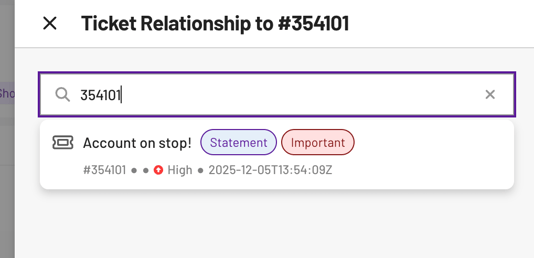
💡 Note: You have the option to unlink any tickets later if needed
The goal?
→ See the complete ticket history without switching tabs
→ Avoid sending duplicate emails to vendors and stakeholders
→ Prioritise and resolve faster with full context at a glance
→ Reduce handling time and SLA breaches
4. Helpdesk Dashboard upgrades
We're redesigning the Helpdesk Dashboard to give you faster access to the metrics that matter most to you. Expanding from a single view, you'll soon have a tabbed experience that separates personal performance, team insights and automation health.
My Dashboard is our first tab release. This dashboard is more actionable, your daily to-do summarising which tickets to action first. This will also be your personal performance at a glance.
We've pre-selected the key metrics you need to track daily. This view is static to keep things simple, but you can add your own charts to the ‘Custom tab’.

Statements
1. Auto‑reconcile
Part of our Touchless journey, Auto-reconcile allows clean reconciliations to close themselves.
How it works
Auto‑reconcile runs when any of the following enabled conditions is true.
1. No pending actions- Marks a statement as reconciled when there are no outstanding actions
- Marks as reconciled after a set period of inactivity
💡 Note: Viewing doesn’t count as an edit. Only user or system changes to existing reconciliations do.
3. Shared with vendor- Marks as reconciled when results have been shared
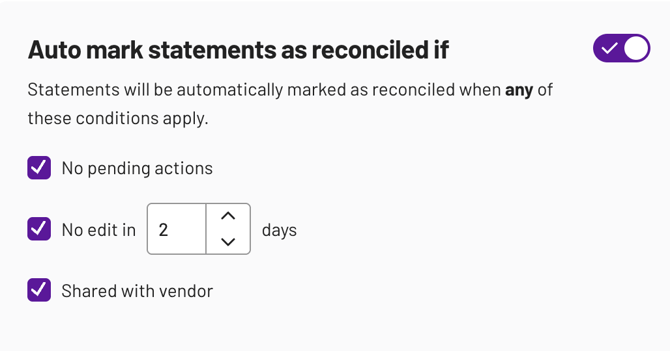
💡Note: Only admins can configure Auto‑reconcile conditions.
Auto‑reconcile turns reconciliation from a time sink into a background process. By getting back to your vendors soon after they send their statements, you hit your team KPIs.
Auto-reconcile, is not just faster reconciliation, it's smarter reconciliation.
The goal?
→ Reclaim hours every week by eliminating manual reconciliation steps
→ Close statements faster and more consistently across your entire vendor base
→ Reduce human error and ensure compliance with audit‑ready automation
→ Scale your finance operations without scaling headcount
2. Automation improvements
We’ve tuned automation to improve vendor matching across formats with average reconciliation rate at 67% from email/manual to reconciliation results.
💡 Note: If your automation isn’t at least where you expect, raise a support ticket or contact your CSM so we can review your setup.