
Contents:
1. The three ways we suggest vendors
When a new email creates a ticket, vendors get assigned to tickets using one of three suggestion methods (sorted by priority):
- Supplier-email match
- Domain match
- AI (LLM) match
We try three matching methods in priority order. The first one that works "wins," and we record which method was used.
1. Supplier-email match (highest priority)
If the sender's exact email address is mapped to a supplier in your Vendor File or in Xelix's Master Vendor Data, we suggest that supplier.
📌 Tip: You will get more accurate vendor matches by keeping your Vendor File up to date.
2. Domain match
If there's no exact email match, we look at the sender's email domain (e.g., @vendor.com) and suggest the supplier(s) you've previously chosen for emails from that domain through Helpdesk or Statements.
💡 Note: We don't map internal email domains or commonly used domains (e.g., @gmail.com) to vendors.
3. AI (LLM) match
If the first two don't help, we read the email content (e.g., signature, footer, invoice details) and suggest the closest vendor(s) from your vendor master.
In addition to these three matching methods, you always have the option to set or change the ticket's vendor(s) manually at any time.
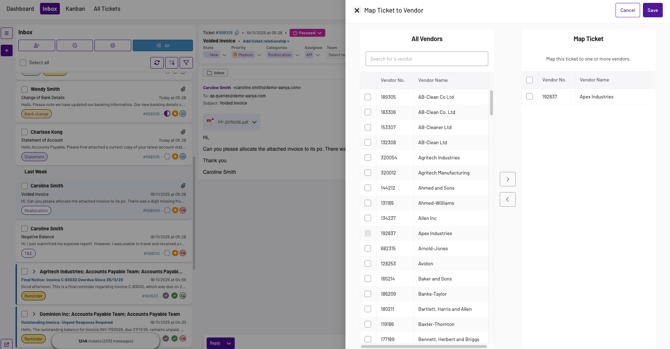
💡 Note: If none of the three methods returns a result, the ticket will have no suggested vendor. In this case you’ll have to manually select the vendor. We would recommend manual mapping practices for best practice.
2. What "priority" means
Priority means that when a new email comes in and creates a ticket, we'll first try to suggest vendors based on the supplier-email match. If that fails, we'll use domain matching. If that also fails, we'll try AI matching.
As soon as we find suggestions, we stop and store them on the ticket along with the source (the method used to determine the suppliers).
💡 Note: We don't suggest suppliers for a ticket that already has suppliers suggested. If a new email comes in to an existing thread for which a ticket already exists with suggested suppliers, we won't update the ticket's suppliers field.
3. Common examples
- Known supplier address: ap@vendor.com is mapped → supplier is suggested via Email mapping.
- Generic address, known domain: invoices@vendor.com not mapped, but you've linked that domain before → supplier suggested via Domain.
- New vendor/contact: no mapping or domain history → we use AI to extract the vendor name and suggest a match.
- Existing ticket gets a new reply: suppliers stay as they are unless a user updates them.